Objective
You can set the triggers and sync URL at Trigger menu.
Details
1) Location
Group Console ▶ Developer page ▶ Trigger ▶Choose a company to set trigger
2) Steps
[Set sync]
1. Enter the URL and click 'Update' button.
2. Go to style page. You can see the sync button activated.
3. Click sync button to open new tab with the URL you entered above. The new tab's URL contains Style ID, style version, external style ID as query string.
[Set Render trigger]
1. Click 'ADD TRIGGER' under Render section.
2. Choose workflow status that fires the trigger.
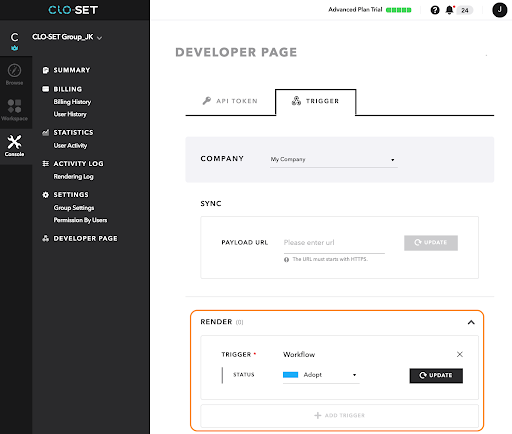
3. Go to Workroom or Style page and change Workflow of style.
4. Render is then requested.
To see in on the page, you need to refresh.
*Render will be requested with the uploaded file's render properties set in CLO S/W.